 EN
EN

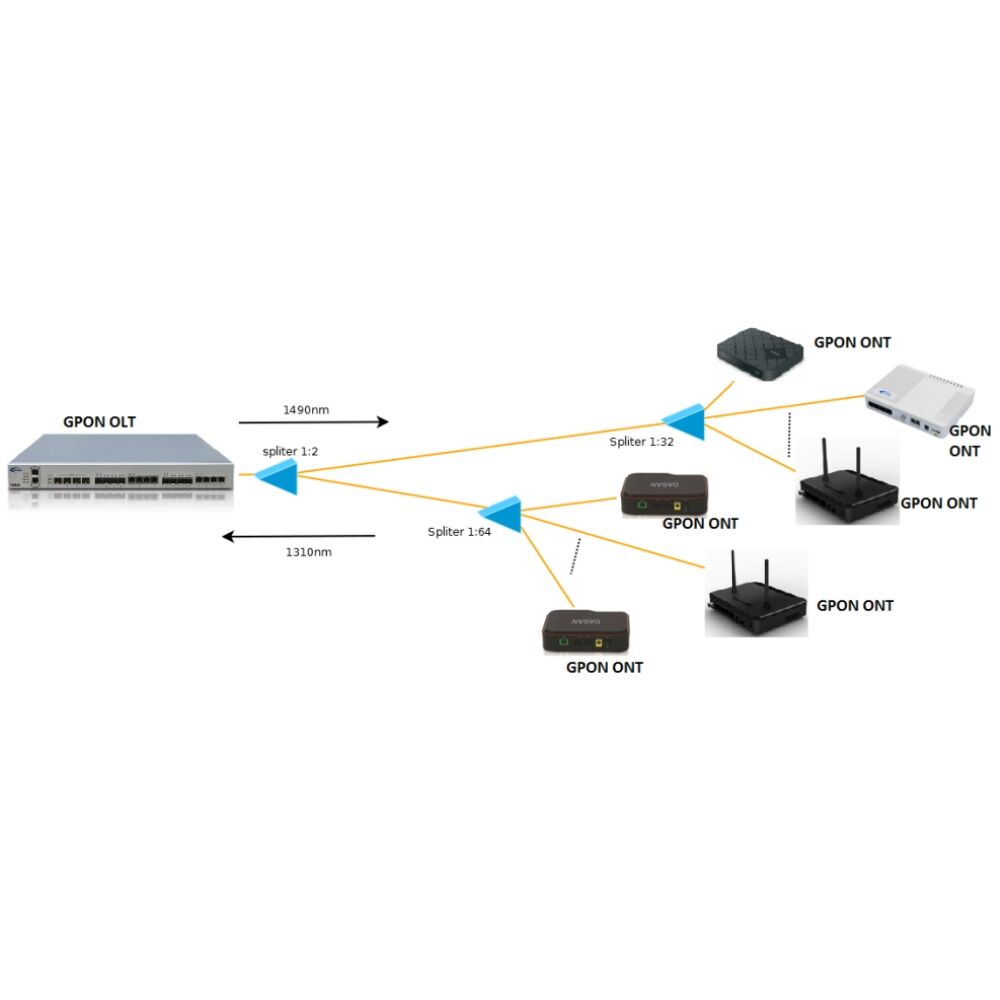
Installing an ONT device correctly is crucial for establishing reliable fiber optic internet connectivity in residential and commercial environments. The optical network terminal serves as the critical bridge between your service provider's fiber network and your internal network infrastructure. Understanding the proper installation procedures ensures optimal performance and minimizes potential connectivity issues that could disrupt your internet service.
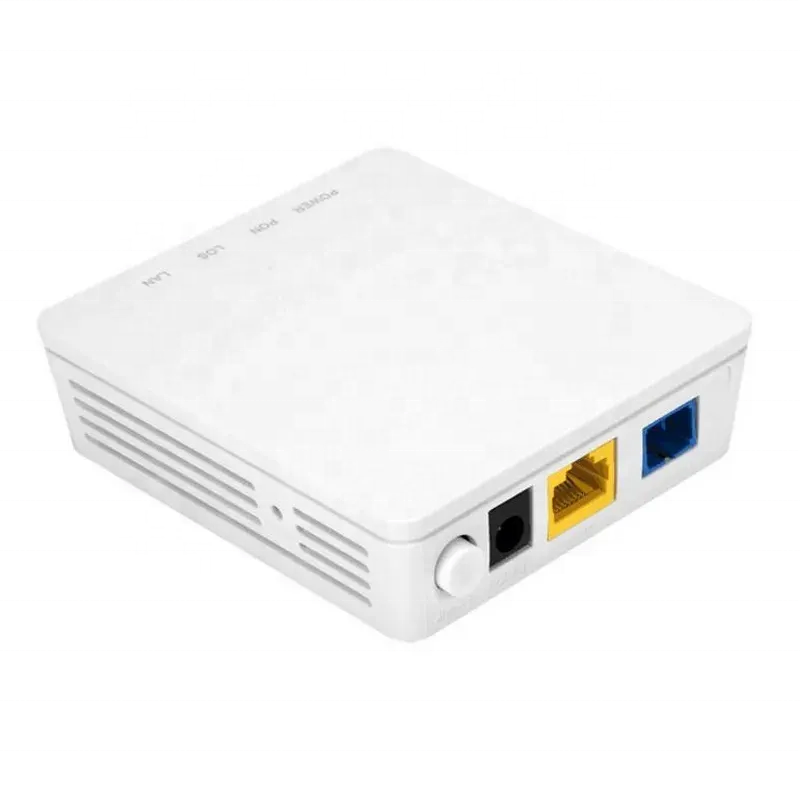
Modern fiber optic networks rely heavily on these sophisticated terminals to convert optical signals into electrical signals that your devices can utilize. The installation process requires careful attention to environmental factors, proper cable management, and adherence to manufacturer specifications. When properly installed, an ONT device provides years of dependable service with minimal maintenance requirements.
Pre-Installation Planning and Site Assessment
Environmental Requirements and Location Selection
Selecting the appropriate location for your ONT device installation requires careful consideration of several environmental factors. The installation area should maintain temperatures between 0°C and 40°C for optimal operation, with humidity levels not exceeding 85% relative humidity. Avoid locations subject to direct sunlight, excessive moisture, or vibration from nearby equipment that could affect the sensitive optical components.
The mounting location should provide adequate ventilation around the ONT device to prevent overheating during extended operation periods. Ensure at least 10 centimeters of clearance on all sides for proper air circulation. Additionally, the selected location must allow easy access for future maintenance activities while remaining secure from unauthorized tampering or accidental damage.
Consider the proximity to power outlets and the planned location of your router or network equipment when selecting the installation site. The ONT device requires a stable power supply and should be positioned to minimize the length of ethernet cables needed to connect to your internal network infrastructure.
Required Tools and Materials Assessment
Gathering the proper tools and materials before beginning installation ensures a smooth and efficient process. Essential tools include a power drill with appropriate drill bits for your wall type, a spirit level for ensuring proper alignment, and a screwdriver set compatible with the mounting hardware provided. Additionally, obtain a fiber optic cleaning kit to maintain connector cleanliness throughout the installation process.
The installation kit should include wall anchors appropriate for your specific wall construction, whether drywall, concrete, or brick. Verify that all mounting hardware is included with your ONT device package, including screws, wall brackets, and any protective covers. Cable management accessories such as cable ties and clips will help maintain a professional appearance and prevent cable stress.
Safety equipment including safety glasses and work gloves should be readily available to protect against potential hazards during the installation process. Having a flashlight or headlamp available ensures proper visibility when working in areas with limited lighting conditions.
Physical Mounting and Positioning Procedures
Wall Mounting Bracket Installation
The wall mounting bracket provides the foundation for secure ONT device installation and must be installed with precision and care. Begin by marking the mounting hole locations using the provided template or by holding the bracket against the wall and marking through the mounting holes. Use a spirit level to ensure the bracket will be perfectly horizontal before marking the hole positions.
When drilling mounting holes, select drill bit sizes that match the wall anchors being used for your specific wall construction. For drywall installations, toggle bolts or heavy-duty drywall anchors provide the necessary support for the ONT device weight. Concrete or masonry walls require masonry anchors and appropriate drill bits designed for hard materials.
After drilling the mounting holes, install the anchors according to manufacturer specifications and attach the mounting bracket securely. Test the bracket stability by applying gentle pressure to ensure it can support the ONT device weight without movement or deflection.
Device Positioning and Alignment
Proper positioning of the ONT device on the mounting bracket ensures secure attachment and optimal cable routing. Align the device mounting slots with the bracket mounting posts, ensuring the device sits flush against the wall surface. The orientation should position input and output ports for convenient cable access while maintaining the manufacturer's recommended positioning.
Verify that all mounting screws engage properly with the device chassis and tighten to the manufacturer's specified torque requirements. Over-tightening can damage the device housing, while insufficient tightening may result in device displacement over time. The completed installation should show no gaps between the device and mounting bracket.
Double-check that the ONT device orientation matches the manufacturer's specifications, particularly regarding ventilation grille positioning and port accessibility. The device should be mounted with status indicator lights clearly visible for monitoring operational status and troubleshooting purposes.
Fiber Optic Cable Connection and Configuration
Fiber Connector Preparation and Cleaning
Proper fiber connector preparation is essential for maintaining signal integrity and preventing connection issues with your ONT device. Before making any connections, inspect both the fiber cable connector and the device's optical port for contamination, damage, or foreign objects. Even microscopic particles can cause significant signal loss or complete connection failure.
Use appropriate fiber optic cleaning supplies including lint-free cleaning wipes and optical-grade isopropyl alcohol to clean connector ferrules and device ports. Clean in a single direction motion to avoid redistributing contaminants, and allow surfaces to dry completely before making connections. Never touch fiber connector end faces with your fingers, as oils and contaminants will degrade signal quality.
Inspect the fiber connector using a fiber microscope or magnifying glass to verify cleanliness and detect any potential damage such as scratches or chips that could affect signal transmission. Replace any damaged connectors before proceeding with the ONT device installation to avoid future connectivity problems.
Signal Connection and Initial Testing
Making the fiber optic connection requires gentle handling to prevent damage to the delicate optical components within your ONT device. Insert the fiber connector into the optical port using steady, straight pressure until it clicks securely into place. Avoid twisting or angling the connector during insertion, as this can damage the ferrule or internal optical components.
Secure any protective dust caps that came with the ONT device for future use when disconnecting the fiber cable. These caps prevent contamination of unused ports and should be stored in a clean, accessible location for maintenance purposes. Verify that the fiber cable has adequate strain relief to prevent stress on the connection point.
After establishing the fiber connection, observe the ONT device status indicators for proper signal acquisition. Most devices display specific light patterns or colors to indicate successful fiber signal detection and processing. Consult the manufacturer's documentation to understand the meaning of various indicator light combinations for your specific ONT device model.
Power Supply Connection and System Activation
Electrical Safety and Power Requirements
Connecting power to your ONT device requires attention to electrical safety practices and verification of power supply specifications. Ensure the power adapter voltage and current ratings match the device requirements exactly, as using incorrect power supplies can damage sensitive electronic components or create safety hazards. The power adapter should be certified for use in your region and meet appropriate safety standards.
Install the power adapter in a location protected from moisture and physical damage, preferably using a surge protector to guard against power fluctuations that could affect ONT device operation. The power connection should be made after all other connections are complete to prevent potential electrical hazards during installation.
Verify that the power outlet provides stable voltage within the specified range for your ONT device. Fluctuating or inadequate power can cause intermittent connectivity issues or permanent damage to the electronic components. Consider installing an uninterruptible power supply for critical applications that require continuous connectivity.
Initial Startup and Status Verification
The initial startup sequence of your ONT device provides important information about installation success and system functionality. After connecting power, observe the startup light sequence according to the manufacturer's specifications. This typically includes power-on self-tests, fiber signal acquisition, and network registration processes that may take several minutes to complete.
Document the startup behavior and final status light configuration for future troubleshooting reference. Normal operation typically shows steady lights for power, fiber signal, and network connectivity once the ONT device has successfully registered with the service provider's network infrastructure. Any blinking or unusual light patterns may indicate installation issues requiring attention.
Contact your service provider if the ONT device fails to achieve normal operational status within the expected timeframe. They may need to provision the device on their network or verify that the fiber connection is properly configured on their end of the network infrastructure.
Network Configuration and Connectivity Testing
Ethernet Port Configuration and Connection
Configuring the ethernet connections from your ONT device establishes the link between the fiber network and your internal network infrastructure. Most ONT devices provide multiple ethernet ports with different speed capabilities, so verify which port offers the highest speed rating for your service plan requirements. Connect your router or network switch to the designated ethernet port using a high-quality ethernet cable rated for the connection speed.
Ensure ethernet cables are properly terminated with secure connections at both the ONT device and receiving equipment. Loose connections can cause intermittent connectivity issues that are difficult to diagnose and resolve. Use ethernet cables of appropriate length to minimize signal degradation while providing sufficient slack for future maintenance activities.
Configure your router or network equipment according to the service provider's specifications, which may include specific VLAN settings, authentication requirements, or IP address configurations. These settings are critical for establishing proper communication with the provider's network infrastructure through the ONT device connection.
Performance Testing and Validation
Comprehensive performance testing verifies that your ONT device installation provides the expected service levels and functionality. Conduct speed tests using multiple testing platforms to verify that download and upload speeds meet your service plan specifications. Test during different times of day to identify any performance variations that might indicate network congestion or configuration issues.
Test connectivity to various internet services and websites to ensure proper DNS resolution and routing through your ONT device connection. Verify that all planned network services function correctly, including voice over IP systems, video streaming, and cloud-based applications that may have specific performance requirements.
Monitor the ONT device status indicators during testing to ensure stable operation under normal load conditions. Any changes in status lights during testing may indicate thermal issues, power supply problems, or signal degradation that requires attention before completing the installation process.
Troubleshooting Common Installation Issues
Signal and Connectivity Problems
Signal-related issues during ONT device installation often stem from fiber connector problems, cable damage, or improper handling during the installation process. If the device fails to detect fiber signal, carefully inspect the fiber connector for damage, contamination, or improper seating in the optical port. Re-clean the connector and device port using proper fiber optic cleaning procedures before attempting reconnection.
Verify that the fiber cable has not been bent beyond its minimum bend radius specifications, as excessive bending can cause signal loss or complete signal interruption. Check for any pinch points, sharp edges, or crushing forces that might affect the fiber cable integrity along its entire length from the service provider connection point to the ONT device.
If signal problems persist, contact your service provider to verify that their network equipment is properly configured and functioning correctly. They may need to perform signal level measurements or network diagnostics to identify issues on their side of the ONT device connection.
Power and Hardware Configuration Issues
Power-related problems can prevent proper ONT device operation and may require systematic troubleshooting to identify the root cause. Verify that the power adapter output voltage matches the device input requirements exactly, using a multimeter if necessary to confirm proper voltage levels. Inadequate or fluctuating power can cause erratic behavior or prevent the device from completing its startup sequence.
Check all cable connections for security and proper seating, as loose connections can cause intermittent problems that are difficult to diagnose. Ethernet connections should click securely into place, and the fiber connector should engage completely with the optical port without gaps or misalignment.
Hardware configuration issues may require accessing the ONT device management interface using the manufacturer's specified procedures. Some devices provide web-based configuration interfaces accessible through connected network equipment, while others may require specific software tools or service provider intervention for configuration changes.
FAQ
What tools are essential for ONT device installation?
Essential tools for ONT device installation include a power drill with appropriate bits for your wall type, a spirit level for proper alignment, screwdrivers compatible with the mounting hardware, and a fiber optic cleaning kit. Additional items such as wall anchors, cable management accessories, and safety equipment including glasses and gloves ensure a professional installation. Having these tools ready before starting prevents delays and ensures proper installation procedures can be followed throughout the process.
How do I know if my ONT device is receiving proper fiber signal?
ONT devices typically display status through LED indicators that show different colors or patterns for various operational states. A steady green or blue light usually indicates proper fiber signal reception, while red or blinking lights may indicate signal problems or connection issues. Consult your specific device documentation for the exact meaning of different light patterns, as these can vary between manufacturers and models. If status lights indicate problems, check fiber connections and contact your service provider for network-side verification.
What should I do if the ONT device fails to connect to the network after installation?
If network connection fails after installation, first verify that all physical connections are secure, including fiber optic, ethernet, and power connections. Check that the device has completed its startup sequence according to the manufacturer's specifications, which may take several minutes. Ensure your router or network equipment is properly configured with any required VLAN settings, authentication credentials, or IP address configurations provided by your service provider. If problems persist, contact your service provider to verify network provisioning and perform remote diagnostics on their equipment.
How often should I perform maintenance on my installed ONT device?
ONT devices require minimal routine maintenance under normal operating conditions, but periodic inspection helps ensure continued reliable operation. Check status indicators monthly to verify normal operation and inspect the installation area for any changes that might affect device operation such as obstructed ventilation or loose connections. Clean the device exterior quarterly using appropriate methods to prevent dust accumulation that could affect cooling. Professional maintenance should be performed by qualified technicians if any performance issues develop or if the device requires firmware updates or configuration changes.